Friday, 13 November 2020

Colored Images

 Today we had done Colored Images by using Google's Arts and culture and we had to watch videos before we have done the images these images that I made took a while. This is my process of doing it, I watched 3 videos then went on Google's Arts and culture website and I had to find a image to color in and found another image. 

I found it hard to find the images I wanted to do.

I found it easy to color the images in.

Next time I'll make more.

Here are my images.


Original images.


Tuesday, 10 November 2020

Spooky House

 For this week we have been doing Spooky houses for a book named Spooky House. I have made a spooky 

house with another person made by someone else, this was hard to make with lots of images.


What is inference?

Inference is a conclusion of evidence and reasoning for a thing or other.

Inference means finding clues and make an conclusion.

I found it hard to find the right images.

I found it easy to get help.

Next time I'll make another. spooky house

Here is the Spooky house


Friday, 6 November 2020

Parihaka


 This week we have been learning about Parihaka which is a place between Mount Taranaki and the Tasman sea in the North Island of New Zealand. By the 1880's, it was said to be the largest Māori village
where everyone was equal and self-sufficient. At the time, the New Zealand government confiscating Māori land. The Parihaka leaders were imprisoned for 16 months. 

My buddy was Sam for the Parihaka.

I found it hard to write the words.

I found it easy to tape the feather together

Letter to Miss Steele

 This week I have been writing a letter to Miss Steele I had to do it on my writing book because I didn't have my chromebook. It took me a while for me to write the letter and then type it.

I found it hard to write the paragraphs and sentences.

I found it easy to write on the chromebook.

Next time I'll try to catch up.

Here is my letter.

Charlie J

40 Campion Rd

Dear Miss Steele

I am writing this letter to say thank you for having me in your classroom for the week and teaching me.

I really liked the art that we had made for halloween. It was fun and creative. I liked painting the background the most.

I enjoyed making the cupcakes, they were delicious. I really liked the cupcakes that Room 3 made for baking. I hope that next time Room 3 could make more.

Thank you Miss Steele. It was a fun week.

Mā te wā

Charlie J


Friday, 16 October 2020

Reading Task

 This week we have been reading The Apple Tree Dilemma. For our task we had to make two circles connected into each other so we could compare characters.

I chose two characters. On from TheOdd1sOut and did dad  from The Apple Tree Dilemma).

I found it easy to write the sentences.

I found it hard to take the photo.

Next time I'll add more writing and more to my circles.


Letter to The Gisborne Herald

Today of this week we've had to send a letter to the Gisborne Herald. We had to do it on a google doc first so we could show our teacher what we've written. It took me a while to finish because I didn't know what to write.

I have found it hard to know what to write.

I have found it easy to send it.

Next time I'll add more writing.


Here is my letter.


 Ni hao Gisborne Herald.

I am a student at St Mary's School which is a Green Gold Enviroschool in Gisborne next to Campion College. To encourage freshwater creatures like little crayfish to come, we need to have shade at our river. We have planted native trees but there is now a lot of blackberry by the river. We can’t plant any more because it is in the way.  Some people have tried the Fix it app and emailing them and the council aren’t responding to anything. I firmly believe the council should respond to us and spray the blackberry so we can keep planting native trees for our native creatures.


Wednesday, 14 October 2020

LunaPic

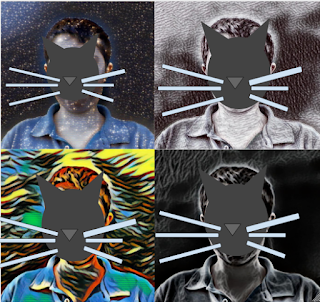
 Today we were making pop art. First we took a photo on our chromebook, after that we uploaded it to Lunapic for a art effect to upload on Google Drawings and make it into a square to get to change the effect. Here are the steps to get started

First (Chromebook).

Click this on your taskbar


Second.

Search "Camera"


Third.


Click Camera when you have this screen at the bottom

4.
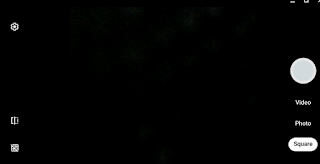
Once you have this opened click the White big button on the right with your face in it.

5: (Lunapic) (On PC/MAC/CHROMEBOOK)


Once when you get on here click upload and go to Recent chose the one you want and go to art at the top click Sketch2 and pick any layout when that's finished go to file (Don't do CTRL+S) save image and png it will download when that's finished go to upload and do the original photo repeat to get 4 different ones.

6

Open Google drawings and upload all 4 photos you took before on Lunapic and go to insert -> image -> upload from computer and recent like said before upload all 4 photos you took before on Lunapic make it into a square and there you go.

Here is what it will look like when you finished.