For the summer learning journey or SLJ for short, I made two images from Googles art coloring book -NASA edition which you can find here. Nasa is a space engineering company that makes rockets.
Here is my pictures


For the summer learning journey or SLJ for short, I made two images from Googles art coloring book -NASA edition which you can find here. Nasa is a space engineering company that makes rockets.
Here is my pictures
This week we had to make a Piskel Sprite Animation/Image for our Cybersmart, I made a Rocket League Merc hitting the ball, and rocket league is an online soccer car game for free. I have two versions of my RL (Rocket League) Merc, One: Still, Two: Animated.
I found it hard to make the Merc going from the left side of the screen to the right.
I found it easy to make the ball falling from the top and making the Merc hit it to the right.
Next time I'll add shading and add more frames to it.
Here is the still version.


How To Make A Piskel.
1. To make a Piskel go to this site.
2. Sign into your Google school/home account.
3. Click on "Create Sprite".
(Bouns) Use the mirror tool to do the same on the other side for your sprite)
4. Make your sprite!
For cybersmart we were doing "My favorite sport" I didn't have a favorite sport so I did "My favorite Food" I couldn't think of what food I liked the most can you guess what it is? Me neither if you look at the slide below you'll find what it is! I hope you also like it and they taste better with tomato sauce and chips.
I was learning how to use Mote (works with school accounts or teachers).
I found it easy to copy the text I had written.
I found it hard to set up Mote for audio.
Here is my Slide.
Today we had done Colored Images by using Google's Arts and culture and we had to watch videos before we have done the images these images that I made took a while. This is my process of doing it, I watched 3 videos then went on Google's Arts and culture website and I had to find a image to color in and found another image.
I found it hard to find the images I wanted to do.
I found it easy to color the images in.
Next time I'll make more.
Here are my images.


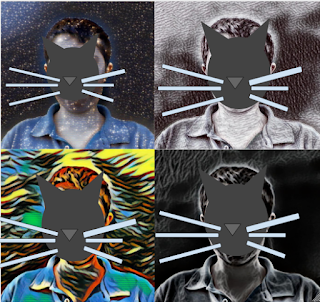
Today we were making pop art. First we took a photo on our chromebook, after that we uploaded it to Lunapic for a art effect to upload on Google Drawings and make it into a square to get to change the effect. Here are the steps to get started
First (Chromebook).

Click this on your taskbar
Second.

Third.

Click Camera when you have this screen at the bottom
4.
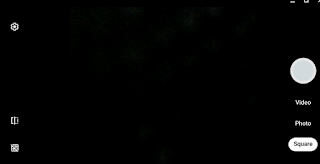
Once you have this opened click the White big button on the right with your face in it.
5: (Lunapic) (On PC/MAC/CHROMEBOOK)

Once when you get on here click upload and go to Recent chose the one you want and go to art at the top click Sketch2 and pick any layout when that's finished go to file (Don't do CTRL+S) save image and png it will download when that's finished go to upload and do the original photo repeat to get 4 different ones.
6
Open Google drawings and upload all 4 photos you took before on Lunapic and go to insert -> image -> upload from computer and recent like said before upload all 4 photos you took before on Lunapic make it into a square and there you go.
Here is what it will look like when you finished.